 Dayana DailyOpen app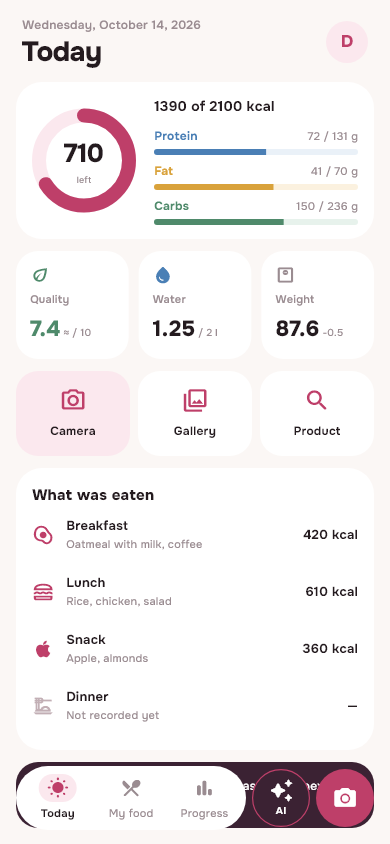
Calendar date and food day
The calendar date changes at midnight. Someone who wakes late or works nights may still be in their usual waking period. Splitting every entry at 00:00 can divide one food day across two dates.
In Dayana, the food day is linked to routine and time zone. The Today screen shows its interval. This helps you understand what period the current entry belongs to, instead of focusing only on the date on the calendar.
Late day example
Imagine waking up during the day and eating after midnight. What is important is not the name “dinner” or the fact that the date has already changed, but the interval of the food day selected by the application according to your schedule. Look at its boundaries before recording a late meal.
This example explains the organization of a diary. It does not recommend specific hours of sleep or nutrition, or evaluate whether shift work is medically appropriate for you.
How to check settings
- Open your profile and the “Daily Routine” or “Routine and Reminders” section.
- Check your wake-up time, sleep time, and time zone settings.
- Go back to Today and see the food day caption.
- When adding food, check the selected meal and recording time.
Don't change your routine just to manually adjust the numbers for the past day. Saved days have their own intervals: the new setting does not turn the old history into a different set of days.
If your schedule or time zone changes
After traveling or changing shifts, review your routine before the next recording period. Don't expect your phone calendar and your food day signature to always match. These are different ways of grouping time.
For a missed entry, first select the desired day in history. If the day is completed, the application can restrict its changes. Don't add a late meal to the current day just because it's faster to open the form.
Reminders and habit tracking
In Daily Plus, personalized reminders for food, water and weight take into account your settings and quiet times. For them to work, you need to enable notifications; behavior depends on the platform. It is more convenient to launch the web version on iPhone from a shortcut on the main screen.
The diary itself is useful even without reminders. Recurring dishes can be taken from the library, and homemade recipes can be saved with your finished dish output. Recipe portion calculation helps not to confuse the problem of time with an error in the mass of food.
Start with food diary instructions, if you want to calmly go all the way from the first entry to viewing your history.
From read to first write
Try it in your breakfast
Open Dayana, add food in a convenient way and check the portion before saving.
Open free diaryHow to install on iPhone →