 Dayana DailyOpen app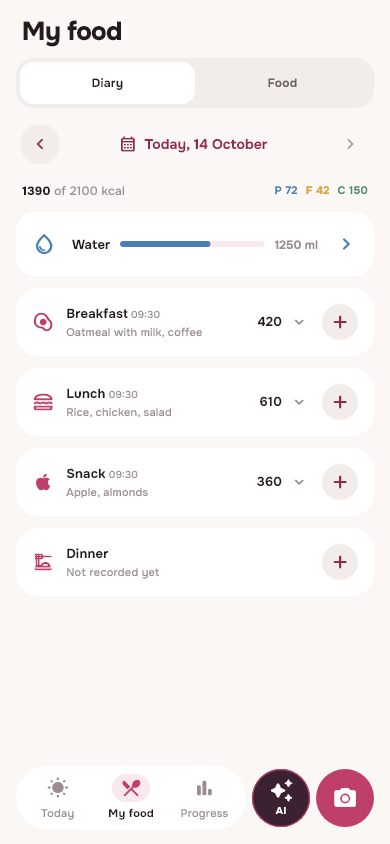
What to prepare before the first recording
Open Dayana in your browser, Telegram or Android, log in to your account and set up your profile. If you already have a diary on another device, use the same email. Two different accounts do not automatically merge history.
Check the schedule: the food day in the application is associated with the period of wakefulness. For late meals, it's helpful to look at the day boundaries on the Today screen. More information about the shift schedule.
Add your usual meal
Select search, camera or gallery. For the product in the package, find the appropriate name and check the meanings with the label. For a mixed dish, you can start with a photo, then correct the suggested ingredients and mass.
You don't have to convert all your usual foods to new recipes at once. First, add an understandable product, check the portion and save it for the desired meal. After that, look how the summary of calories and macros has changed.
What details help avoid confusion
- The weight of the portion eaten is more important than the external size of the plate.
- List drinks and additives separately if they are not in the main record.
- Do not mix raw weight with cooked weight.
- Check the name and manufacturer if products have similar cards.
- If the whole dish is not eaten, write down your part.
If you notice an inaccuracy, open the record and correct the available fields. Change restrictions may apply for a completed day. Don't create a second post instead of correcting the first one if both describe the same food.
Make repetition easier
Save your favorite products and your dishes to your library. A homemade recipe is convenient when the composition is the same, but the portions vary. When calculating, take into account the yield of prepared food: analyzed this using a numerical example.
Repeating a familiar entry saves time, but does not cancel the portion check. If you eat less today or the composition has changed, adjust the new option before saving.
Look at the records, not just the numbers
Water, weight and history help to observe habits. A one-time result does not have to reflect a sustainable change. A journal is more useful when the original entries are clear and you can refer back to them later.
Kmacros in the application are calculated from the selected products and portions. AI values remain approximate; the program does not prescribe a diet or determine medical reasons for weight changes.
Choose a convenient format
Daily Basic provides basic diary functions and a basic photo analysis limit. Plus adds advanced AI capabilities and reminders. On iPhone you can use the browser and a shortcut on the main screen, and on Telegram you can use the Mini App.
Check out the features of the free calorie counter and try the same account on another device. For a good start, a convenient, repeatable script is more important than a large number of entries in one evening.
From read to first write
Try it in your breakfast
Open Dayana, add food in a convenient way and check the portion before saving.
Open free diaryHow to install on iPhone →