 Dayana DailyOpen app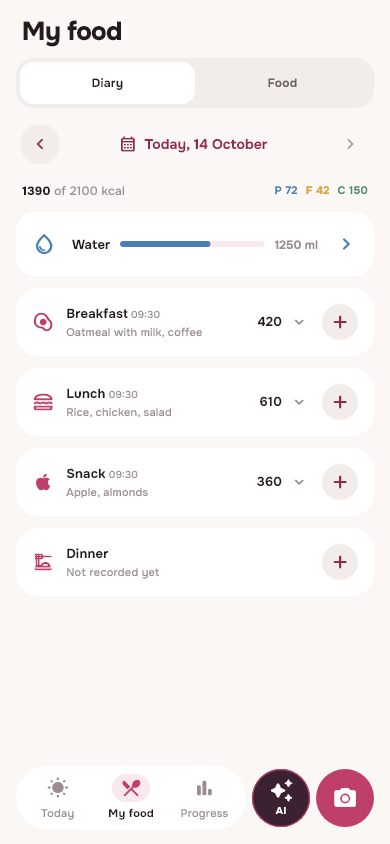
How to open a diary in Telegram
Go to official Dayana bot and click “Open Dayana” in the bot menu. A web application with a food diary will open. If the button is not visible, check that @dayanadaily_bot is open and update Telegram.
To continue an existing story, log in with the same email you use in your browser or Android application. The Telegram account itself does not mean that you are already logged into the desired diary account. Creating a second account does not transfer old entries to it.
What to do on the Today screen
After logging in and setting up your profile, you can add food through search, camera or gallery. In the recording, check the portion and the selected meal. Calories and Kmacros are calculated according to saved data; Photo recognition gives a rough estimate that's worth checking.
- Find a familiar product through search if there is an exact label or known serving size.
- Start with a photo for a mixed dish and elaborate on the suggested ingredients.
- Use recipes and library for repeatable homemade meals.
- Mark the water and record the weight in the appropriate sections.
If scrolling is inconvenient
Use the current version of Telegram. Dayana requests disabling Mini App's vertical collapse gesture where Telegram supports this setting. Built-in browser capabilities vary by client version and device.
If the camera, photo upload, or other system function behaves unexpectedly, open Dayana in a regular browser. Logging in with the same account gives access to the same server diary. For iPhone there is instructions for adding an application to the home screen.
What requires the Internet
Logging in, searching the server and analyzing photos requires a connection. If the request fails, do not create a new record blindly: first check whether the original record appears after the connection is restored. Diary changes use resubmission protection, but identical activities started over can be separate entries.
Do not delete app or browser data in an attempt to speed up syncing if there are unsaved changes. First, restore the connection and wait for the result.
One diary on different devices
Telegram is convenient as a quick entry. The Android app or web version shortcut may be more convenient for daily use of the camera and system permissions. Choose the format according to your device, keeping one account.
You can start with Daily Basic. Plus features and current limits are shown in your profile. See what's included in the free calorie counterbefore selecting additional features.
From read to first write
Try it in your breakfast
Open Dayana, add food in a convenient way and check the portion before saving.
Open free diaryHow to install on iPhone →