 Dayana DailyOpen app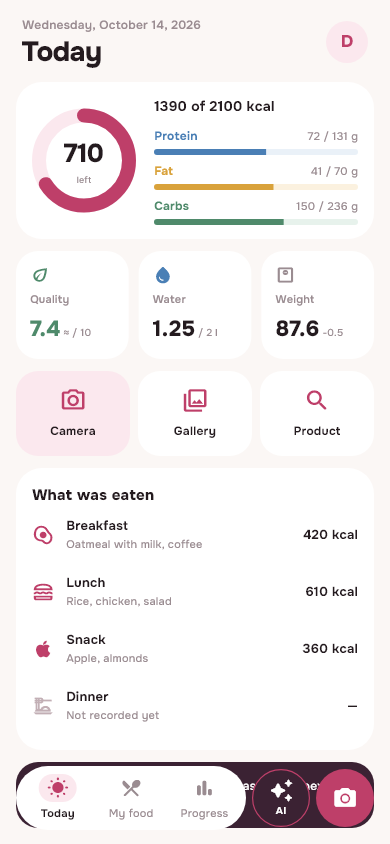
What to choose: short answer
Try Dayana Daily if you want a calorie and macro diary in English and Russian, with meal photos, your own recipes, water and weight tracking. Open it in your browser or through Telegram. Free Daily Basic includes manual logging and photo analysis within your account limit. Android has a downloadable APK; on iPhone, add the web app to your Home Screen.
FatSecret is worth saving if your usual directory, history and input methods already suit you. It has a free macronutrient tracker, barcode scanner, and community; Smart Food Scan photo analysis is listed in Premium. It's confirmed official Free and Premium table, and not our assumptions about the competitor.
This article was brought to you by the Dayana Daily team. This is a proprietary product comparison and not an independent app rating. We reviewed FatSecret's public instructions on October 20, 2026; Availability of functions and prices should be checked in your version of the application. The screenshots below show the actual Dayana interface with demo data. We did not conduct a comparative test of the accuracy of the two services.
[You can try Dayana's free diary](/) before deciding to switch: start with one familiar dish and see if the recording method suits you.
FatSecret and Dayana: comparison by task
In the table we separate the free diary and additional features. The absence of a function in the table does not mean that another application does not have it.
| Task | FatSecret | Dayana Daily |
|---|---|---|
| Calories and macronutrients | Macronutrient accounting is available in Free | Diary and macros are included in the free Daily Basic |
| Food from a photograph | Smart Food Scan in Premium; the result can be checked | Photo analysis with a basic limit in Basic, increased limits in Plus; check before saving |
| Barcode of packaged product | The scanner is listed in Free | There is a search for products; information and portion must be checked with the packaging |
| Water | Water Tracker listed in Premium | Water metering is included in Basic |
| Everyday Recipes | One-touch recording of recipes is listed in Premium | Basic recipes and library are included |
| Help with planning | Meal Planner and Smart Assistant are listed in Premium | Meal Plan, Shopping List and Daily AI included in Plus |
| Where to open | Applications for iOS and Android | Browser, Android APK and login via Telegram; on iPhone - web version |
| Expanded access | Subscribe; cost depends on region | Plus is now connected by the administrator, the term and functions are visible in the profile; no automatic charge |
Sources for the FatSecret column: plan comparison and regional conditions, Smart Food Scan instructions. For Dayana: current Basic and Plus capabilities and application screens. For the photo analysis limit of your account, see “Profile → Plan”: we do not promise unlimited AI.
Example 1: lunch based on a photo, part of which was left
Let's say there is chicken, rice and sauce on the plate, but you only ate half the rice and left the sauce. A photograph of the entire plate and the portion actually eaten are different initial data. In Dayana, start with a photo, then check the composition and correct the quantity before saving. It is better to add the known mass manually; Hidden oil cannot be reliably measured from a photograph.
- Take a photo so that all the products you want to record are visible.
- Check the names: fried and boiled chicken are different entries, as are dry and cooked rice.
- Specify the portion eaten and remove unnecessary components. If initially there were 200 g of rice, and half was eaten, you need 100 g of rice for recording.
- Check the result and save your meal. Do not add the same products a second time through search.
This is a training scenario and not a published measurement of model accuracy. B official FatSecret instructions also provides for viewing the result and adjusting portions. Therefore, the choice here lies in the convenience of a specific process and access to a function, and not in the promise that only Dayana can count calories from a photo.
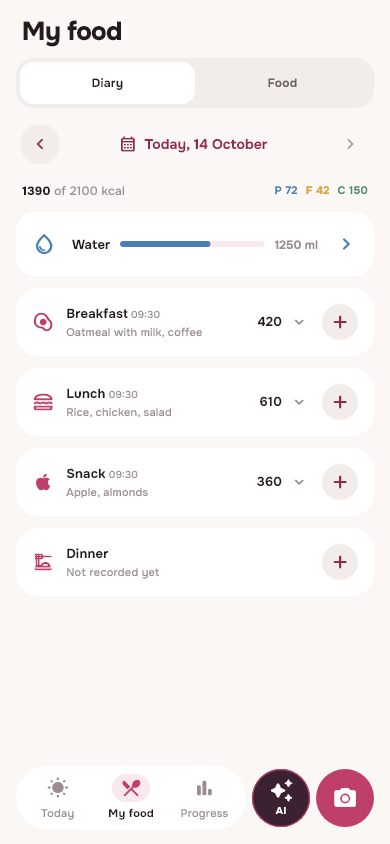
Diary: from dish to summary of the day
Breakfast 420, lunch 610 and snack 360 kcal give 1390 kcal. These are demo entries in the real interface, not the result of a food recognition test.
Open full screenshot ↗On the diary screen you can check already saved meals. In the demo, 420 + 610 + 360 = 1390 kcal. This is a sum of records and not an independent verification of actual food. If the entry is incorrect, first correct its composition or portion. Detailed photo verification checklist will help you spot common errors before saving.
Example 2: homemade dish and your own portion
For homemade food, the ingredients and the yield of the finished dish are important. Let's take a conventional recipe in which the sum of the energy of all ingredients is 1200 kcal, and after cooking and weighing the result is 800 g of food. Numbers are needed to explain the calculation; it is not the nutritional value of a particular dish.
| What we think | Calculation | Result |
|---|---|---|
| All ready dish | Amount by ingredients | 1200 kcal per 800 g |
| Per 100 g | 1200 / 800 × 100 | 150 kcal |
| Serving 200 g | 150 × 200 / 100 | 300 kcal |
| Half of this serving, 100 g | 150 × 100 / 100 | 150 kcal |
In Dayana, create a recipe in the library, indicate the ingredients used and the weight of the finished dish, then add your portion to your diary. When re-cooking, check the yield: excess water changes the mass and value per 100 g, even if the amount of energy of the ingredients is the same. Consider oil and dressing separately if they end up in the dish.
It is more useful to evaluate such a scenario based on your own familiar recipe: whether the necessary products are available, whether it is clear what weight to enter, whether it is convenient to repeat the portion tomorrow. Here we are not saying that another diary cannot work with recipes. Separate instructions for calculating a homemade dish shows you all the way from ingredients to plate.
Example 3: daily routine and clear story
If you go to bed late, eating after midnight doesn't always feel like the start of a new day. In Dayana, the food day is linked to routine and time zone. In your profile you can check the mode; When recording a late dinner, look at which food day it belongs to. Do not focus only on the change of calendar date.
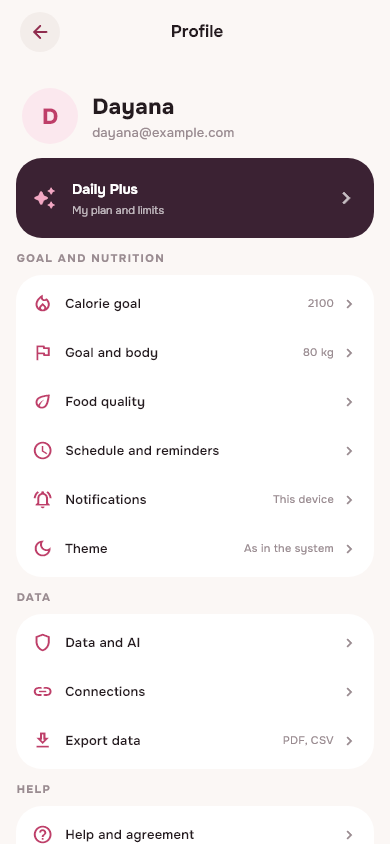
Settings for your day
The routine and goals are in the profile. The name, address and values on the screen are for demonstration purposes; the 2100 kcal goal is not a recommendation to the reader.
Open full screenshot ↗After several entries, open the history and progress. Compare periods taking into account absences: a day without records does not mean that the person did not eat anything. Weight change also does not prove the effect of the application. The following screenshot shows the summary interface with training values, not the user's weight loss history.
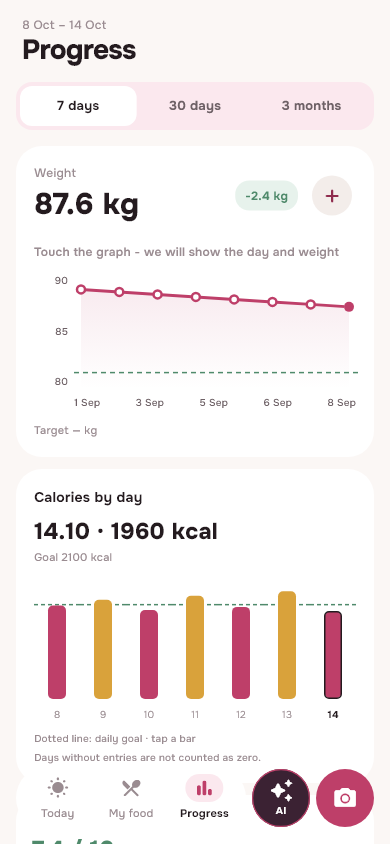
A story to return to
Example of a weekly summary in the application. All numbers, including weight change -2.4 kg, are demonstration data and not a review or confirmed weight loss result.
Open full screenshot ↗A handy calorie counter should help you go back to your original notes and understand the numbers. Before choosing an application, check not only the beautiful home screen, but also editing yesterday's lunch, repeating a familiar dish and viewing the previous period.
When Dayana is suitable, and when the transition is not needed
Try Dayana if you want to keep a free food diary, check food photos and use one account on different devices. Recipe library, water and weight are available without Plus connection. Launch via Telegram is convenient if you are used to opening everyday tools in the messenger. Log in to the same account on different devices.
If the native client from the App Store is important, keep in mind: we now offer a web version for iPhone. You can add to Home screen via Safari. If FatSecret already contains important history, do not delete it for the sake of experimentation. There is currently no automatic transfer of the FatSecret diary to Dayana.
Dayana has no comparatively proven advantage in recognition accuracy, catalog completeness, or weight loss speed. Test a few of your products and one home recipe: this will provide more personal choice than the promise of "the most accurate base." AI and nutritional values remain estimates, and screenshot goals are not intended to replace individual consultation with a professional.
How to compare two diaries for three days
Do a small test using the same initial data. Do not change the recipe, the serving weight and the input method at the same time: otherwise you will compare different dishes.
- On the first day, find three familiar products in both diaries. Check the values per 100 g with the labels and write down the same weight.
- On the second day, add one homemade recipe with known ingredients and yield. Make sure you write down a portion and not the whole pan.
- On the third day, try photo analysis, if it is available in your plan. Note which names and grams had to be corrected. Don't take the agreement of two scores as evidence of accuracy.
- Go back to your history: find yesterday's lunch, correct the portion and see if the outcome of the day is clear. Evaluate the number of fixes, convenience and functions available to you.
Save the initial masses, final records and plan conditions for yourself. This example can be reproduced and discussed. We do not publish fictitious user reviews or ratings. If you try Dayana, write to support: what was recorded, what had to be corrected, what function helped or hindered. For a public review, your experience is enough; do not send your password or personal medical information. The publication of the text and screenshot will be agreed upon separately.
Questions before the transition
Can you use Dayana for free? Yes: Daily Basic includes the diary, search, recipes, water, weight and photo analysis within a basic limit. Plus adds more AI and planning features; check your current account limits in Profile.
Does FatSecret have photo analysis? Yes, Smart Food Scan is described in its official help as a Premium feature. Both processes require portion checking; photography is not a substitute for scales.
Can old entries be transferred automatically? There is currently no such import in Dayana. FatSecret describes export reports to PDF or CSV: You can save a copy of your history. The presence of a file does not mean that it is compatible with another service's import.
How to install Dayana on iPhone? Open the web version in Safari and add it to your Home screen. On Android, you can download the APK from the main page. Don't look for a non-existent version of Dayana in the App Store.
Which calorie counter is best? Choose the one that makes it easy to check the underlying values and log consistently. If you want a FatSecret alternative, try Dayana for free with your own meals and decide from that experience.
Sources and comparison conditions
- FatSecret: Free, Premium and regional conditions - Features and access to advanced features.
- FatSecret: Smart Food Scan instructions - photo, evaluation of portions and verification of the result.
- FatSecret: export and print report - PDF and CSV, no promise of transfer to Dayana.
- Dayana Daily: features and plans, about the application and developer - own product with which comparison is being made.
Retrieved October 20, 2026. The names FatSecret, FatSecret and Fat Secret are used to identify the application being compared; the article does not imply partnership or endorsement on his part. The competitor information is based on the listed official pages, the Dayana scenario is based on the interface and capabilities of the application. The screenshots contain sample data. Power values are approximate; The application does not make diagnoses or prescribe treatment.
From read to first write
Try it in your breakfast
Open Dayana, add food in a convenient way and check the portion before saving.
Open free diaryHow to install on iPhone →